


Works flawlessly since 3 years. MacBook surface has no scratch after nearly daily use. Saves space on my tiny desk.
Your cart is empty.
Choose your MacBook to see the dock made for it.
Choose your MacBook See all products Ascrono® MacBook Docking Station
$229.99
Rated 4.8 out of 5 from 559 reviews
· 30,000+ soldOpens with your
Ascrono® MacBook Docking Station
$229.99
Rated 4.8 out of 5 from 559 reviews
· 30,000+ soldOpens with your
Desk accessories
 CableCare TrayHides the cables under your desk
From $84.99
CableCare TrayHides the cables under your desk
From $84.99
 Magic Mouse 2 ChargerCharges while it rests on its stand
$37.99
Magic Mouse 2 ChargerCharges while it rests on its stand
$37.99
 Magic Mouse 2 GripA fuller, easier hold
$27.99
Magic Mouse 2 GripA fuller, easier hold
$27.99
 USB‑C to USB‑A AdapterFor your older accessories
$9.99
USB‑C to USB‑A AdapterFor your older accessories
$9.99
 Gift cardLet them pick their Mac’s dock
From $100.00
Gift cardLet them pick their Mac’s dock
From $100.00
Help
Find your MacBook model Shipping Returns, exchanges and warranty Track your order For teams Contact us FAQs About Us
The docking station
 Ascrono® MacBook Docking StationFor MacBook Pro 14-inch and 16-inch (2021–2026, M1–M5) and MacBook Air 13-inch (2022–2026) and 15-inch (2023–2026), M2–M5. Made for the bare MacBook.
Rated 4.8 out of 5 from 559 reviews
· 30,000+ soldOpens with your
$229.99
Ascrono® MacBook Docking StationFor MacBook Pro 14-inch and 16-inch (2021–2026, M1–M5) and MacBook Air 13-inch (2022–2026) and 15-inch (2023–2026), M2–M5. Made for the bare MacBook.
Rated 4.8 out of 5 from 559 reviews
· 30,000+ soldOpens with your
$229.99
Desk accessories
CableCare TrayHides the cables under your desk
From $84.99
Magic Mouse 2 ChargerCharges while it rests on its stand
$37.99
Magic Mouse 2 GripA fuller, easier hold
$27.99
USB‑C to USB‑A AdapterFor your older accessories
$9.99
Gift cardLet them pick their Mac’s dock
From $100.00


Slide your closed MacBook in: monitor, charger and accessories connect.
Pick your MacBook first.
Buying it as a gift? Give a gift card
 MacBook Air 13-inch Type E
2022–2026 · M2–M5
MacBook Air 13-inch Type E
2022–2026 · M2–M5
Google, Netflix, MrBeast, Stanford and 44 more organizations and universities
Based on the work or school email or company name buyers gave at checkout. Not an endorsement by these organizations.
Slide your MacBook in and your monitor, power and accessories connect. Slide it out and take it with you.
Made from high quality alloys, in space grey to match your MacBook
Up to 40 Gbps through your MacBook’s own Thunderbolt ports. Plug your monitor, hub or adapter into the dock once, then just slide your Mac in.
Plug your Apple charger into the dock once. Up to 140 W on the 16-inch MacBook Pro with Apple’s original adapter and cable; up to 96 W over plain USB-C.
Creators who set up their desks with an Ascrono.
Hear from our customers
Overall rating: 4.8 / 5 from 559 reviews.
Works flawlessly since 3 years. MacBook surface has no scratch after nearly daily use. Saves space on my tiny desk.

Perfect product! Matches the aesthetic of my MacBook brilliantly. Premium materials. The only hiccup was that the MagSafe failed, but I was able to work around it until customer service sent a replacement which was also a really easy and painless process. 5 stars.

Ruggedly built yet attractive, it keeps my MacBook Pro tucked away yet connected to my music workstation keeping the workflow much more manageable than it would otherwise be. The Ascrono is functional and affordable.

I slide my Macbook Pro 14" M3 Max and I'm back to working again. It has rubber feet to keep it from sliding around. Good weight to it and it feels solid. The aesthetics looks and feels like a first party Apple accessory.

Does as described. Stay away unless you have 2 monitors. I think it works best that way vs having 1.

was amazing , just I want to know if I can turn off my computer and turn on with out open the computer ?

Qualitative, design and performant docking station. The design is really sleek, I love it !

Great doc. Saves space. Works perfectly with my setup. Would highly recommend!

Good

Great dock, easy to use with my 15” MacBook Air.

We were looking for a solution to free up desk space and tried the Ascrono docking stations and they are incredible. Slide your Mac in and everything seamlessly connects to your external monitor and charges your computer at the same time. It just works!!!

Like the ability to dock quickly and save desk space. The only negative is that the headphone input is on the same side of the usbc that the dock uses and cannot be used.

Ascrono is very comfortable and easy to use. It brings everything together in one place — I love it.

It works really well! The material is good and it stands solidly. What I miss is a product that is more versatile across different generations of laptops and its corresponding layouts. What was a bit (I wouldn’t say disappointing) unexpected was the fact that the HDMI was not part of the deal, because it is on the other side of the laptop. But it could be conceivable to design a product that fits the other side of the laptop too.

This is my 2nd Ascrono docking station. And I’ll say that i’m even more impressed by this one. This one is essentially instant. At the touch of keyboard key or press or my mouse the dock wakes up my MacBook Pro and it’s ready to go. There’s no lag or much wait time. I also like that the new dock has the mag charger port for faster charging as well. My only wish is they made it in a darker space grey to match my MacBook a bit better, but really that’s a very small cosmetic thing that doesn’t affect the power and usability of the dock. I recommend the Ascrono dock to all my friends with a MacBook because it’s just that good. It makes for a clean and tidy desk where you can take your MacBook on the go, and just slide it right into the dock to continue working from your big screen. Thanks a bunch Ascrono for such a great product!

It’s was a great choice to add to my setup!! Ascrone docking station works flawlessly!!

The dock is beautiful and works perfectly with my Lenovo Monitor and the MacBook Pro M4. Finally no cable ok my desk.

Amazing cleanup of my desk, unfortunately my boss broke my laptop two weeks after I set it up.

Easy set up: connected three hubs, a Wacom tablet, Time Machine drive, a RAID drive and a media drive. Cleared a bunch of space off my desk. Ready to roll!
MacBook Docking Station for MacBook Pro with Touch Bar (2016-2020)

Amazing quality docking station

Amazing and solid. I now have a hybrid laptop/desktop setup and couldn’t be happier. Well done Ascrono!

Nice product!

Fast delivery, great quality product.

Easy to use and incredibly fast to connect.

전 한국 사람 입니다. 정말 최고에요. 잘쓸게요!

From the design to the simplicity of usage and care it’s amazing. Helps to save space on my desk. No button to press, just slide in the Mac and enjoy. Really love this item

I'm not very tech friendly so when I ran into problems getting it to work with my Mac and two monitors they were quick to respond and diagnosed the problem. The problem was I had purchased the wrong model for my Mac. I was able to purchase an adapter and the problem was resolved. The product now works awesome and the customer service was amazing!!

Easy setup with excellent results! This is an awesome product that really frees up considerable space on my work area. Loving it!

The Ascrono is the only dock that works exactly right. iI connects quick and disconnects quick! This is my second one, and I've tried them all.

I've had my eyes on the Ascrono docking station for awhile now. After purchasing an Apple Studio display, the docking station became a no-brainer. I love how I can operate at a desk with my MBP and slide it out for portable use. I am also using an ethernet port adapter on the back of the dock, so in desk mode I'm on hardwired ethernet mode. This configuration allow me to better perform photo editing.

E' la soluzione ideal per il Mac! Io l'ho adottata sul mio Mac Book Pro 16" M1... Perfetta!

Love my Ascrono docking station . I have one at home and one at work. The install was seamless and it replaces any need for a desktop computer. It has simplified my life. Great product.

This is my second Ascrono docking station. I upgraded my Mac and needed a new dock as well. Unfortunately, my previous dock was not compatible with the newer MacBook, but it was time for an upgrade. I had such a great experience with my first Ascrono dock that I didn’t hesitate to buy again. I didn't even mind having to buy another dock because they are very specific to your type of laptop. I'd rather it just work. Guess what, it just works. Unpack it, plug everything in, and enjoy a cleaner desk space. I absolutely love how easy it is to slide out and pop into my bag for the road or just to take into another room of the house. It couldn’t be any easier.

Dock works great. It looks great and the customer service is fantastic! Love this product.

Great dock! Sits great and tidy on my desk and enables quick connectivity.

Great dock! Sits great and tidy on my desk and enables quick connectivity.

I'm grateful to the Ascrono team for their assistance with my monitor display issue. The replacement they provided for my Macbook Pro M3 has proven to be much more stable.

I have purchased several of these units for my leadership team so they have one at the office and one at home. Best support device I have used with my Mac Book Pro.

Very easy to setup; very sturdy base, save a big space on my desk; and set and forget;

I have a tiny workspace. This dock is perfect.
The questions people open most.
Yes, on every MacBook it fits except the MacBook Air with M2, which supports one external display. The dock connects straight to your Mac’s own ports, so you get the displays your chip supports with the lid closed.
Your Apple charger, a USB-C or Thunderbolt monitor, and USB-C accessories such as a hub or adapter, an external drive, a keyboard or a mouse. You plug them in once; after that you just slide your Mac in.
On the back are 2 USB-C ports (Thunderbolt 4 compatible, up to 40 Gbps) and a MagSafe port, connected straight to the ports on your Mac’s left side. Cables and adapters are sold separately.
No. Your MacBook stands upright with air on both sides, and the dock’s vent lines up with the MacBook Pro’s vents.
There is one dock for each MacBook size: MacBook Pro 14-inch (2021–2026, M1–M5) · Type C, MacBook Pro 16-inch (2021–2026, M1–M5) · Type D, MacBook Air 13-inch (2022–2026, M2–M5) · Type E and MacBook Air 15-inch (2023–2026, M2–M5) · Type F.
To check yours, open the Apple menu and choose About This Mac. Find your model
Because it connects your MacBook’s own ports to the cables at the back, so the dock stays slim and you choose the connections your desk needs. Need HDMI, Ethernet or USB-A? Plug your hub or adapter into the dock once, as you would into your Mac.
It fits today’s models, up to the MacBook Pro with M5 chips and the MacBook Air with M5. Every 14-inch MacBook Pro from 2021 to 2026 has the same body, so one dock has fitted five chip generations.
Have another question? See all FAQs
Can’t find the answer you’re looking for? We reply within 24 hours, 7 days a week.
Two quick steps to identify which MacBook you have
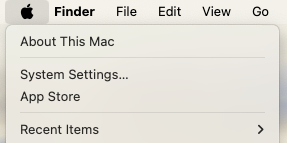
Click the Apple logo in the top-left corner and select "About This Mac".
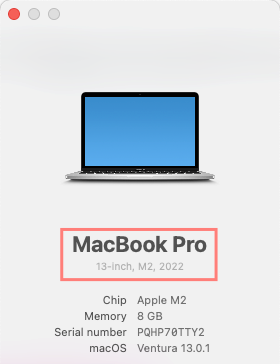
You'll need your MacBook's model (Pro or Air) and screen size (13", 14", 15", or 16").
We'll email you these instructions so you can find your MacBook model later.